

 LinkMy.Events
A text number for your event that tells the right people when plans change.
Give your conference, gala, or even a 50th birthday celebration its own number. Attendees text it about the schedule, parking or lunch, and get answers straight from your run of show. Speakers, vendors and staff are tagged, so a message about the loading dock never reaches an attendee.
Think about the last conference you went to.
You didn't open the event app. You asked the nearest person with a lanyard where the coffee was, and what room the 2 o'clock speaker had moved to.
Now you're the one with the lanyard. Each “where's registration?” is someone on your team stopping what they're doing. Multiply that by two hundred people, a room change and a venue whose Wi-Fi gives up mid-conference, and your staff spend the day as a help desk.
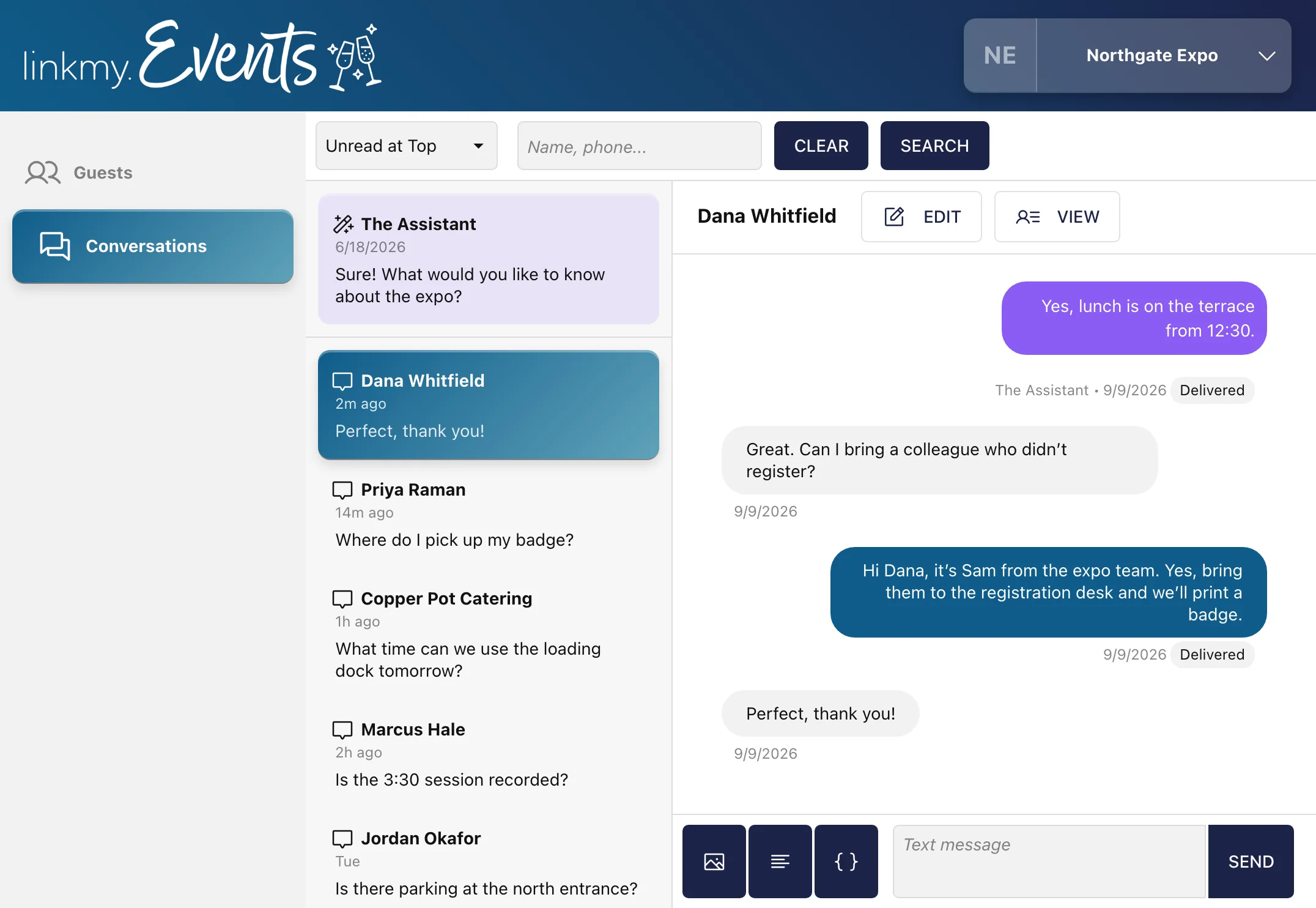
LinkMy.Events fixes this. One simple text number. A dashboard for all your team members. Attendees get an answer without hunting for a person, via the phone signal, so the Wi-Fi doesn't matter. Your team gets to run the event like they planned.
The day
One event day, hour by hour.
What the attendee gets, who the message goes to, and what it saves your team.
Run of show
Northgate Expo · day one
The night before
Everyone registered gets the morning's details: when doors open, where to park, where badges are. You wrote it last week and scheduled it.
Your teamFewer people at the desk asking the same three things.
Attendee list
7:45 am
Doors open.
Forty people ask where badge pickup is. The AI Assistant answers each of them from your run of show, in a sentence.
Your teamYour team stays at the desk instead of pointing.
AI Assistant answers
1:15 pm
A room changes.
The keynote moves to Hall B. You send one message to the people tagged for it, and only them.
Your teamNobody at the doors redirecting a crowd.
Keynote list
3:30 pm
A vendor needs the dock.
The caterer texts about tomorrow's load-in. The AI Assistant answers from your vendor details. Anything it can't answer, it texts to you.
Your teamYour operations lead isn't fielding calls on the floor.
Vendor list
9:00 pm
After hours.
Attendees ask what time breakfast starts. The AI Assistant answers. Most phones stay quiet at dinner.
Your teamYour team gets an evening.
AI Assistant answers
The morning after
A thank-you and a feedback link go out, scheduled before the event even started. Tag people as attended when they check in, then export that list for the sponsors.
Your teamThe follow-up is done before you've packed up.
Everyone who came
1:15 pm, by text
AI Assistant · Northgate Expo
Tags
Tags do the sorting.
Tag people however your event works: attendee, speaker, vendor, staff, VIP, the sessions they picked. Import your registration list with the tags already on it. Then send to a tag, search by one, or export it.
Each message arrives as its own text, so nobody's stuck in a 200-person group chat. Delivery receipts show you who it reached.
Your team
Your whole team works from one number.
Coordinators, the registration desk and whoever's looking after sponsors have access. They see each conversation, can reply from the same number, and use shared snippets for the questions that come up all day. When the AI Assistant can't answer, it texts you, and whoever's free picks it up.
Using an event app too?
Keep it. A text reaches everyone else.
Not everyone installs an event app, and it won't load when the venue Wi-Fi drops. A text still gets through, with nothing for attendees to download, and your first message can link to your app for the people who use it.
The event website
A free event website that updates when your plans do.
The number comes with an event website, built from the event details you enter, the same ones the AI Assistant answers from. Put the link in your first message to attendees.
- The date and venue, RSVPs, your FAQs, locations and parking, hotels, and links to anything else, like the full schedule.
- Change a detail once, and the website and the AI Assistant both have it.
- Pick a theme and a layout to match your event.
- It works on a phone, which is where attendees will look.
Questions
What organizers usually ask before an event. Anything about your own venue or schedule, bring it to the demo.
How large an event can it handle? +
From a hundred-person gala to a multi-day conference.
Can we import our registration list? +
Yes. Export it from your ticketing tool, or keep it in a spreadsheet, and import it with the tags already on. There's no direct connection to other tools for now.
Does it need the venue Wi-Fi? +
No. Texts go over the phone signal, so it works in halls where the Wi-Fi doesn't.
Can attendees from other countries text the number? +
The number works with US phone numbers only.
Can we use one number for several events? +
Yes. One number can carry you through as many events as you run.
Can we keep the number we already have? +
Often, yes. We can use your existing business line for texts, and your phone system stays the same, so you take calls the way you always have. This doesn't work with mobile numbers.
What does it cost? +
Small to medium events, up to 120 attendees, are $99 a month. Larger events, up to 250, are $199 a month. You're billed monthly, not by the event date, and if you need something custom for a larger event, we're happy to help.
Tell us your headcount and your dates.
We'll show you everything in a 15-minute demo, set up for an event like yours, and tell you what it would cost. You're live about a day later.